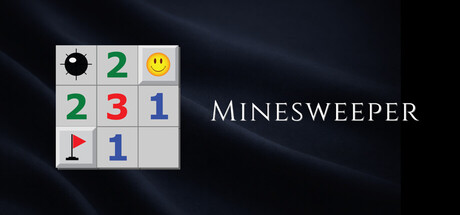

Minesweeper is a rare kind of game: instantly understandable, endlessly replayable, and ruthlessly fair—until it isn’t. One wrong assumption and the board reminds you why it’s been the ultimate “one more try” logic puzzle for decades. This modernized version keeps the timeless rule set intact while adding quality-of-life features that make it more comfortable on a Mac in 2026: undo for misclicks, hints when you’re stuck, zoom for oversized fields, and customization for players who want more (or fewer) mines.
What Minesweeper Is (and Why It Still Works)
The premise is elegant: clear the board without detonating hidden mines. Click a tile and you’ll either reveal a mine (game over) or a number. That number tells you how many mines touch that tile (including diagonals). From there, it’s deduction: combine information from multiple numbers, mark suspected mines with flags, and open safe spaces to build a complete picture.
The reason Minesweeper endures is that it rewards careful thinking while staying fast. The feedback loop is tight—every revealed number is a new clue, every flag is a commitment, and every decision changes the shape of the puzzle.
Authentic Gameplay with Modern Touches
This release aims to feel like the classic Minesweeper many Mac gamers remember, but with contemporary conveniences that reduce friction:
- Authentic Minesweeper rules: The core logic and win condition remain true to the original experience.
- Multiple difficulties: Play preset levels from Easy through Expert depending on how much deduction (and risk) you want.
- Custom challenges: Create your own board configurations—especially handy if you want denser minefields or specific grid sizes.
- Undo feature: Ideal for trackpads and high-speed play, undo helps when a slip turns a solved puzzle into an explosion.
- Hints: When the board becomes a knot of possibilities, a hint can help you re-orient without immediately brute-forcing guesses.
- Zoom functionality: Useful on large boards so you can navigate and read patterns comfortably.
Options for Faster, Cleaner Play
Part of getting good at Minesweeper is reducing the “interface tax” so your attention stays on deduction. This version includes advanced options that long-time players often look for:
- Quick flagging: Flag suspected mines efficiently to maintain momentum.
- Optional question marks: A classic tool for tracking uncertainty when you’re not ready to commit to a flag.
- Save and load: Step away mid-board and return later without losing your progress—perfect for tackling bigger custom fields.
Compete, Share, and Replay
Minesweeper’s simplicity makes it surprisingly competitive—once you understand common patterns, shaving seconds off a clear becomes the metagame. If you enjoy measuring improvement, these features help:
- Global leaderboards: Compare times and performance with players worldwide.
- Game sharing: Share your results or interesting boards with friends.
Themes and Presentation
While Minesweeper has never needed flashy visuals, a clean look matters when you’re reading numbers for long sessions. This version offers diverse themes, including a calmer “flower field” style, letting you choose a vibe that’s easy on the eyes without changing the underlying logic.
How It Feels on Mac
Minesweeper is an ideal fit for macOS: quick to launch, easy to play in short bursts, and satisfying during longer, focus-heavy sessions. The undo and zoom features are particularly welcome for trackpad users and for anyone who likes larger boards where precision clicking matters.
Tips for New (and Returning) Sweepers
- Start with the edges: Corners and borders reduce the number of adjacent tiles, making early deductions simpler.
- Learn the common patterns: “1-2-1” and “1-2-2-1” arrangements often imply forced mine placements.
- Use question marks sparingly: They’re great for tracking possibilities, but too many can clutter your logic.
- Undo isn’t cheating—use it wisely: Treat it as misclick protection, not a replacement for reasoning.
Mac System Requirements
Minimum:
- OS: 10.6
- Processor: Apple Or Intel
- Memory: 512 MB RAM
- Storage: 80 MB available space
Verdict
Minesweeper remains a masterclass in minimalist design: a grid, a few numbers, and a constant tug-of-war between certainty and risk. This modern edition keeps the classic strategy intact while adding the kinds of features that make it smoother to live with—undo, hints, zoom, customization, and competitive leaderboards. If you want a pure logic fix that fits perfectly into a Mac gaming routine, Minesweeper is still a great way to test your nerve and your math.



Comments
Sign in to join the conversation.
Log in to commentNo comments yet. Be the first to join the conversation.