
Overview
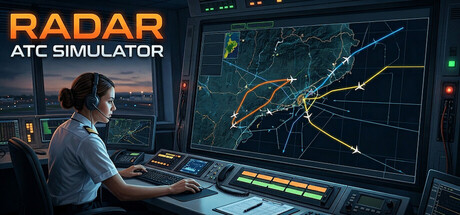
Radar ATC Simulator is a focused air traffic control experience built around the core loop of working a radar sector: monitor traffic, anticipate conflicts, and issue timely clearances to keep aircraft safe and moving efficiently. Rather than leaning on flashy presentation, it aims for the practical pressures of the job—staying ahead of the picture, making small adjustments early, and avoiding cascading mistakes that quickly compound under higher traffic loads.
What You Do in Radar ATC Simulator
Your role is to manage an assigned area in a radar environment with varying difficulty levels. Each session challenges you to balance two priorities that frequently compete with each other:
- Safety: Maintain recommended separation distances and avoid conflicts.
- Efficiency: Keep aircraft moving smoothly, minimizing unnecessary vectors or altitude changes while staying within designated airways.
You’ll be working directly with the tools controllers rely on most in a radar setting, issuing commands that shape how aircraft flow through your sector.
Key Controls and Responsibilities
Radar ATC Simulator gives you the essential levers of control:
- Headings: Vector aircraft to resolve conflicts, sequence arrivals, or rejoin airways.
- Speeds: Create spacing on final or prevent an overtake at cruise.
- Flight levels (altitude): Stack traffic vertically, manage crossings, and keep flows deconflicted.
The challenge isn’t just knowing that these tools exist—it’s using them early enough and with restraint. Over-vectoring can solve one conflict while creating two more downstream, and excessive altitude changes can reduce efficiency or push aircraft out of optimal routing.
Difficulty, Feedback, and Learning Curve
The simulator includes varying difficulty levels, making it approachable for newcomers while still offering pressure for players who want a more demanding traffic picture. A short tutorial provides initial guidance, but the real learning happens through repetition: reading trajectories, predicting convergences, and building the dexterity to make quick, accurate decisions.
Your score provides feedback on your performance, reinforcing the habits that matter most: keeping aircraft safe, avoiding unnecessary deviations, and maintaining a clean, efficient flow within the airways.
Why It Works on Mac
For Mac players who enjoy systems-driven simulation—where improvement comes from mastery rather than unlocks—Radar ATC Simulator fits well. The radar-style interface and decision-making focus lend themselves to longer “one more attempt” sessions, especially as you develop your own preferred methods for sequencing, conflict resolution, and workload management.
Tips for New Controllers
- Think ahead: If two aircraft will be in trouble in two minutes, act now.
- Use small changes first: Minor heading or speed adjustments can prevent major interventions later.
- Keep it tidy: Returning aircraft to airways and standard flows helps reduce future complexity.
- Avoid chain reactions: Solving a conflict is good; solving it without breaking three other routes is better.
Mac System Requirements
Minimum
- OS: macOS 12.0
- Processor: Apple Silicon or Intel i5
- Memory: 8 GB RAM
- Graphics: Metal-capable GPU
- Storage: 200 MB available space
Recommended
No recommended specs were provided.
Bottom Line
Radar ATC Simulator is a compact but demanding look at what makes air traffic control compelling: constant prioritization, tight decision-making, and the satisfaction of keeping a complex system running smoothly. If you enjoy simulations where skill, efficiency, and calm under pressure are the real progression systems, this one is worth a spot in your Mac library.



Comments
Sign in to join the conversation.
Log in to commentNo comments yet. Be the first to join the conversation.