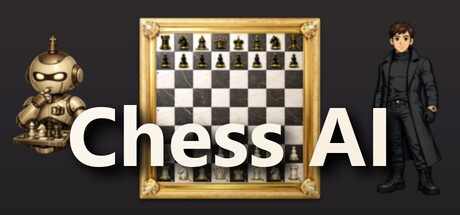

Master the Royal Game on macOS
Chess AI is built for players who want more than a basic digital board. It’s a focused, single-player chess package for Mac that blends an adaptive AI opponent with coaching-style feedback, then wraps it all in a light progression system that keeps you coming back for “one more game.”
Whether you’re learning openings for the first time or trying to tighten up endgames you already know, the core promise here is simple: play, review, improve—and look a bit cooler while doing it.
Adaptive AI That Meets You Where You Are
The standout is the AI design philosophy: rather than forcing you into a single static strength setting, Chess AI encourages gradual growth through multiple difficulty levels and an opponent that can feel appropriately punishing (or forgiving) depending on how you set it up.
For beginners, this means you can practice fundamentals—hanging pieces less often, spotting simple tactics, and learning to convert material advantages. For experienced players, higher difficulty offers a more demanding test that rewards calculation, patience, and clean technique.
Post-Game Analysis: Turn Losses Into Lessons
Playing is only half the loop. After the handshake, Chess AI leans into improvement tools with move-by-move review and move quality ratings. You can revisit key moments, identify turning points, and see suggestions for stronger continuations.
This kind of feedback is especially helpful for:
- Spotting blunders you didn’t even realize were blunders
- Understanding why a move fails (not just that it fails)
- Building better habits over time—safer piece placement, better king safety, and more consistent endgame conversion
It’s a practical approach: you’re not just grinding games, you’re reviewing them in a way that makes your next session measurably sharper.
Progression and Customization Without the Usual Strings Attached
Where many chess apps stop at the board, Chess AI adds a bit of game-y structure: statistics, rank/progression tracking, and unlockables. As you improve, you’ll earn access to new boards and piece sets, and you can customize your avatar with different clothing and accessories.
Crucially, it does this without nickel-and-diming. The game explicitly advertises no in-app purchases: one payment unlocks the full experience.
Sound and Accessibility
The presentation is rounded out by an original soundtrack by The Teps and multi-language support, which makes it easy to recommend as a low-friction pick for a wide audience. It’s also lightweight, and doesn’t demand a dedicated GPU—ideal for MacBook Air owners who just want a smooth, responsive chess client with modern features.
Key Features
- Multiple AI difficulty levels
- Post-game analysis with move quality ratings
- Statistics and progression system
- Unlockable cosmetics for your character, board, and pieces
- Original soundtrack by The Teps
- Multi-language support
- No in-app purchases — one payment, full game
Mac System Requirements
Minimum
- Requires an Apple processor
- OS: macOS 13 (Ventura)
- Processor: Apple M1
- Memory: 2 GB RAM
- Graphics: No dedicated graphics card required
- Storage: 500 MB available space
Recommended
- Requires an Apple processor
Who Is Chess AI For?
- New players who want adjustable difficulty and clear post-game feedback
- Improvers who like reviewing mistakes and tracking progress
- Offline-focused Mac gamers who prefer a premium purchase over subscriptions and microtransactions
- Style-conscious strategists who enjoy unlocking boards, piece sets, and avatar cosmetics as motivation
Verdict
Chess AI hits a sweet spot for Mac users: a clean single-player chess experience with meaningful analysis tools, a motivating progression layer, and a fair monetization model. If you want an AI opponent that can grow with you—and a review system that helps turn every loss into a lesson—this is an easy one to put on your macOS strategy shortlist.



Comments
Sign in to join the conversation.
Log in to commentNo comments yet. Be the first to join the conversation.