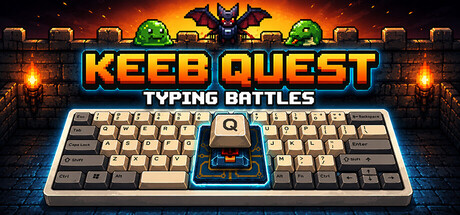

Keeb Quest: Typing Battles on Mac
Keeb Quest: Typing Battles takes the familiar grind of typing practice and turns it into something closer to an arcade action game—where every correct keystroke is damage, every mistake costs momentum, and improvement is the real progression system. Instead of mindless drills, you’re fighting enemies and bosses, navigating different modes built around specific typing skills, and tracking results with the kind of feedback you’d expect from a dedicated training tool.
It’s a great fit for Mac players who want an actual game loop (runs, bosses, scores, leaderboards) without losing the practical benefits: stronger accuracy, higher WPM, and better touch-typing confidence.
Core Gameplay: Your Keyboard Is the Combat System
The hook is simple: you type what the game throws at you, and the faster and cleaner you do it, the better you perform. What makes Keeb Quest click is the variety in how it tests you—short bursts, sustained paragraphs, reaction-based patterns, and structured lessons that isolate weaknesses.
Because it’s designed like a game rather than a pure trainer, you’re constantly being nudged into a “one more run” mindset. That’s ideal for building consistency, which is usually the hardest part of improving typing long-term.
Modes and Features
Classic Mode (Quick Runs With Escalating Pressure)
Classic Mode is the most arcade-like option: you battle through waves of enemies that ramp up over time. Every five rounds you choose your next boss from a random pair, giving runs a light roguelite flavor—enough variability to stay interesting without becoming unreadable chaos.
Runs typically last 8–12 minutes, which makes it easy to slot in a session as a warm-up before work, school, or a longer gaming night.
Boss Survival (Endless Skill Checks)
If you want focused pressure testing, Boss Survival is where Keeb Quest shows its range. It offers five distinct boss types:
- Paragraph
- Falling Words
- Word Grid
- Dialogue
- Line Rush
There’s also Gauntlet, a nonstop sequence through every boss type in a single run—ideal when you want a comprehensive test across different typing “muscles” (endurance, accuracy under time pressure, scanning, and rhythm).
Adventure Mode (Low-Pressure Typing With Branching Story)
Adventure Mode is the relaxed alternative. Instead of pushing for score, you type through branching stories and make choices that shape the narrative. The pace is intentionally more comfortable, making it a good on-ramp for newer typists or anyone who hates the stress of timers.
The branching structure and multiple endings add a reason to return beyond pure practice.
Academy (Structured Lessons + Skill Drills)
The Academy is the “serious” side of Keeb Quest, but it’s still framed with game structure. You can run targeted drills to:
- Practice weak keys
- Build speed safely without sacrificing accuracy
- Warm up before harder modes
Most notably, it includes a full curriculum of 140 lessons designed to teach touch typing end-to-end. There are also challenge lessons and chapter bosses that act like exams—useful for confirming whether you’ve actually internalized new finger patterns rather than just getting lucky in a run.
Progress Tracking That Actually Helps You Improve
Keeb Quest doesn’t just throw scores at you—it gives you tools to understand what’s happening when you type. Expect:
- Per-key heatmaps to spotlight weak or error-prone letters
- WPM curves to show pacing and stamina across a session
- Accuracy grades for quick performance readouts
- Session history for trend-spotting over time
- High scores and achievements for goal-based motivation
- Leaderboards to compete with friends and the global player base
That combination is important: fast typists usually improve by finding their bottleneck (specific keys, specific transitions, or accuracy dips under pressure), and the game gives you enough data to train with intent.
Why It Works Especially Well on Mac
Typing games live or die on feel—consistent input, quick restarts, and frictionless sessions. On macOS, Keeb Quest’s short run structure and drill-friendly Academy make it easy to build a routine. It’s also well-suited to Mac users who spend a lot of time at the keyboard already and want practice that doesn’t feel like homework.
Mac System Requirements
Minimum
- OS: macOS 10.15 (Catalina)
- Processor: Any dual-core (2 GHz+)
- Memory: 4 GB RAM
- Graphics: Any GPU with WebGL support
- Storage: 500 MB available space
Recommended
- OS: macOS 10.15 (Catalina)
- Processor: Any dual-core (2 GHz+)
- Memory: 4 GB RAM
- Graphics: Any GPU with WebGL support
- Storage: 200 MB available space
Bottom Line
Keeb Quest: Typing Battles is an unusually complete package: part arcade challenge, part boss-rush typist test, part story-driven chill mode, and part structured touch-typing course. If you want a Mac game that makes you tangibly better at a real-world skill—without sacrificing the satisfaction of runs, bosses, and measurable progress—this one earns a spot in your library.



Comments
Sign in to join the conversation.
Log in to commentNo comments yet. Be the first to join the conversation.