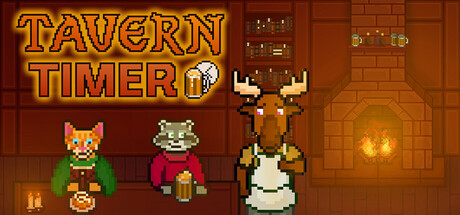

There are plenty of timer apps on macOS, and plenty of cozy games too—but Tavern Timer is built around a simple idea: your real-life focus should feel rewarding. Instead of staring at a sterile countdown, you pull up a chair by a fireplace while an animal tavern keeper runs the show. Every completed work session translates into in-game progress, turning studying, chores, and project time into the kind of “just one more session” loop that actually helps you get things done.
What is Tavern Timer?
Tavern Timer is a productivity tool wrapped in an idle tavern simulation. You set a timer (or use Pomodoro mode), work on your real tasks, and when the session ends you collect coins. Those coins unlock decorations and upgrades that let you shape a personalized tavern—your own cozy focus zone that evolves as your consistency improves.
It’s designed to be comfortable as a background companion: your tavern can run quietly while you work, or sit front-and-center when you want a little extra ambient motivation.
Customize Your Tavern (and Your Vibe)
The customization is the game’s main reward loop, and it’s surprisingly deep for something that’s fundamentally a timer app. You start by choosing one of five keepers—cat, moose, prairie dog, lizard, or kinkajou—and then build out your space from the floor up.
Across 200+ decorations and 25+ themes, you can pivot your tavern into whatever helps you focus: cozy cabin warmth, a snowy hideaway, dark academia corners, vaporwave lounge energy, or more fantasy-leaning looks like dwarven/gnomish spaces. The result is a productivity setup that feels personal rather than prescriptive.
Ambient Focus: Music, Weather, and Mood
When you’re using a timer for long stretches, ambience matters. Tavern Timer leans into that with both music and environmental controls.
- 6 curated playlists including tavern lofi, jazz, upbeat lofi, cafe acoustic, and moody lofi
- Weather and time-of-day modes like day, rain, night, and snow
It’s the kind of “set it and forget it” atmosphere that can help reduce the urge to tab-hop while still giving you a gentle sense of place.
How the Productivity Tools Work
Under the cozy presentation is a straightforward toolkit designed around common productivity patterns:
- Pomodoro timer for focused work sessions with breaks
- Custom timers if you prefer longer deep-work blocks or shorter sprints
- Built-in to-do list with tasks, subtasks, and completed task tracking
Complete a session, collect your in-game payment, and put those coins toward new furniture, decor, walls, flooring, and more. The longer you stay consistent, the more your tavern reflects the effort you’ve put in—without needing you to “grind” anything except your real-life goals.
NPC Guests and the Gentle “Idle Sim” Layer
Your keeper isn’t alone. The tavern serves a rotating cast of visitors—25 unique NPCs including turtles, raccoons, otters, horses, and other critters—adding life to the room while you work. It’s not a management sim in the traditional sense; it’s more like a living diorama that rewards you for staying on task.
Focus-Friendly Options (Including a Minimal Mode)
One of the biggest challenges for gamified productivity apps is avoiding the trap of becoming the distraction. Tavern Timer addresses that with options meant to keep it supportive rather than demanding:
- Runs in the background while you work
- Customizable UI including background color options and the ability to hide the UI
- Focus Mode that shrinks the window down to mainly the timer
That makes it easier to keep the cozy presence without losing a second monitor (or your attention) to constant animation checking.
Planned Updates Through 2026
The developers have indicated planned free updates through 2026, including holiday and seasonal decor drops. For Mac players, that matters: the app’s long-term value is directly tied to new themes and items that keep the reward loop fresh without forcing a restart.
Key Features (At a Glance)
- 5 charming keepers: Mama Cat, Moomoo the Moose, Preeree the Prairie Dog, Skinkerton the Skink, Kajou the Kinkajou
- 200+ decorations and 25+ decor themes
- 25 unique NPCs that visit your tavern
- Weather modes: day, rain, night, snow
- 6 music playlists for different moods
- Pomodoro mode + custom timers
- To-do list with subtasks and completion tracking
- Earn coins by completing focus sessions to unlock decor
- Background-friendly operation with Focus Mode and UI options
- Handmade art and music (no AI)
Mac System Requirements
Minimum:
- OS: macOS 11 or newer
- Processor: 2 Ghz
- Memory: 2 GB RAM
- Graphics: 256 MB video memory, OpenGL 2
- Storage: 400 MB available space
Who Is It For?
If you like the structure of Pomodoro timers but hate how clinical most productivity apps feel, Tavern Timer is an easy recommendation—especially if cozy aesthetics help you stay consistent. It’s also a great fit for Mac users who want a lightweight companion app that can sit on a corner of the screen (or disappear into the background) while still giving you a satisfying sense of progress.
At its best, Tavern Timer doesn’t just measure time—it makes focused time feel like you’re building something.



Comments
Sign in to join the conversation.
Log in to commentNo comments yet. Be the first to join the conversation.