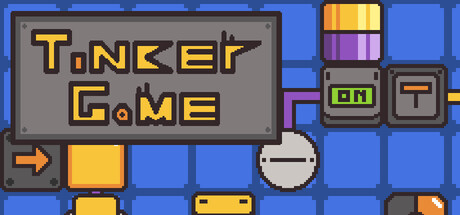

Make Whatever You Can Imagine in Tinker Game
Tinker Game (aka Tinker™) is a circuit-building sandbox that leans hard into creativity: you’re given a set of electronic/logic-style components and a workspace, and you’re free to build. It can be as approachable as a blinking timer or as deep as layered mechanisms, display-style logic, and interdependent systems that feel closer to a miniature engineering project than a traditional level-based puzzle game.
That open-ended design is the point. If you can describe the behavior you want—timing, switching, signaling, repeating, gating, chaining—you can usually prototype it with the tools available and iterate until it behaves exactly right.
Core Features
- 20 different components to combine into functional circuits and contraptions.
- Five build layers that let you stack complexity without turning your workspace into a tangled mess.
- Import/export saves so you can move projects between devices, archive builds, or share them with others.
- Collaboration-friendly sharing via save files—great for learning from others or co-developing a big project.
- Custom soundtrack support, allowing you to use your own music alongside or in place of the included tracks.
Building on Layers: Why It Matters
Tinker Game’s multiple layers are one of its most Mac-friendly quality-of-life features because they help keep ambitious projects readable. Instead of squeezing everything onto a single plane, you can separate systems by function—timing on one layer, control logic on another, output/display mechanisms elsewhere—then iterate on one subsystem without constantly disturbing the rest.
For players who like complex automation, layers are also what make “big builds” practical. You can scale up from a simple loop into a full machine with modular parts that are easier to debug and refine.
Sharing, Iterating, and Learning From Others
Open-ended building games live or die by how easily you can revisit and exchange ideas. Tinker Game supports importing and exporting saves, which makes it simple to:
- Back up your best creations
- Transfer projects between Macs (or across devices if you play elsewhere)
- Share a circuit with a friend for feedback
- Collaborate by passing versions back and forth
This also helps the community side of the game: downloading a clever build and tracing how it works is often the fastest way to learn new patterns and improve your own designs.
Demo vs Full Game
According to the game’s feature list, the full release expands beyond the demo with:
- The full 20 components
- Multiple layers to build on
- Importing and exporting saves
- Custom soundtrack support
- Additional mouse tools
- Enhanced customization
- Fun settings
- Over 100 unique splash-texts
Who Is It For?
- Logic/automation fans who enjoy building systems rather than solving fixed puzzles.
- Creative tinkerers who like experimenting, iterating, and optimizing.
- Players who love sharing builds, learning from others, or collaborating on larger projects.
- Mac users who want a relaxed but deep sandbox that can be played casually (simple gadgets) or seriously (large multi-layer mechanisms).
Mac System Requirements
Minimum
- OS: Mac OS 14
- Processor: Apple M1 or Intel Core M
Recommended
- OS: Mac OS 14
- Processor: Apple M1 or Intel Core M
Why Tinker Game Belongs on Mac
Tinker Game is at its best when you’re free to experiment: laying out a concept, testing signals, reorganizing a messy prototype into a clean multi-layer design, then exporting it to share. For Mac players who enjoy engineering-style creativity—without being boxed into rigid objectives—it’s an inviting sandbox with enough structure (components, layers, tools) to support genuinely complex builds.




Comments
Sign in to join the conversation.
Log in to commentNo comments yet. Be the first to join the conversation.