
Overview
Your weapons fire themselves. The dangerous enemies are your problem.
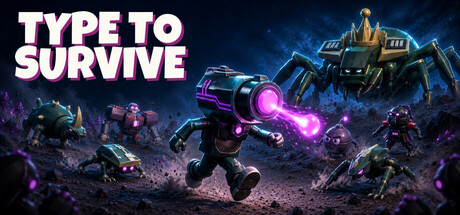
Type to Survive is a survival roguelike with a sharp twist: the usual “bullet heaven” loop of auto-attacking weapons and constant repositioning is fused with typing as an active combat mechanic. You steer with the arrow keys while your loadout chews through the mob, but the enemies that actually matter—elites, shielded threats, and bosses—demand your attention and your accuracy.
The result is a game that feels like equal parts arcade survival run, target-priority puzzle, and typing test under pressure. If you enjoy the flow-state dodging of horde games but want something that forces deliberate decisions mid-chaos, this one’s built around that tension.
Core Gameplay: Dodge, Aim With Your Brain, Kill With Words
Moment-to-moment play is split into two jobs:
- Movement and survival: steer continuously with the arrow keys to avoid getting boxed in.
- Precision kills: type the words shown above elite enemies to eliminate them, or type to crack shields so your auto-firing weapons can finish the job.
Because the horde never stops advancing, typing isn’t a calm mini-game—it’s something you do while you’re kiting, threading through gaps, and constantly reassessing which threat will collapse your escape route next. Choosing the right target before the crowd surrounds you is the defining skill.
Bosses and “Super” Phrases
Boss encounters escalate the typing concept by demanding full phrases while attack patterns continue to play out. It’s not just about speed; it’s about keeping your hands and attention steady when the screen is trying to force mistakes.
On top of that, the game features a Super mechanic: when charged, you’re prompted to complete a phrase before time runs out to clear the horde. Partial progress still matters—correct letters can wipe part of the crowd—even if you don’t finish in time. It’s a smart “clutch tool” that rewards calm execution without turning failure into an all-or-nothing punishment.
Controller Mode: A Keyboard-Free Option on Mac
Typing games often live or die on whether they support players who want the concept without the keyboard requirement. Type to Survive addresses that directly with a dedicated Controller mode:
- Movement: left stick or D-pad steering.
- Combat input: press on-screen button sequences instead of typing words.
- Targeting: flick the right stick to change targets.
- Super: click the right stick when charged, then enter an eight-button sequence.
You can choose Xbox, PlayStation, or Nintendo button styles in the options, and controller runs maintain separate local records. Daily Challenge and Score Attack can be used as practice in this mode.
It’s also a great fit for couch play via Steam Remote Play streaming to a compatible TV—particularly relevant for Mac players who want an “arcade cabinet” vibe from the living room.
Buildcraft: Six Heroes, Upgrade Drafts, and Weapon Evolutions
Under the typing (or sequence) layer, this is a full-on build-driven roguelike. You pick from six heroes, each with a starting weapon and passive, and then draft upgrades as you level up. The game encourages synergy hunting and hard commitments rather than passive accumulation.
Highlights of the progression and build systems include:
- 47 upgrades to draft during runs.
- Eight weapon evolutions to chase.
- Pre-run chips: slot up to three before a run to shape your plan.
- Permanent upgrades: unlockable, and notably refundable when you want to respec and experiment.
Some upgrade choices lock out alternatives (for example, committing to stronger bolts versus faster firing), which makes the drafting feel more like steering toward a “real build” than simply grabbing whatever’s strongest in the moment.
Modes: Short Runs, Endless Pressure, and Score Chasing
Type to Survive supports multiple ways to play depending on whether you want a contained run or an endurance session:
- 10-minute runs for tight, repeatable attempts.
- 20-minute runs for longer build arcs.
- Endless for survival-first bragging rights.
- Difficulty modifiers: Agony and Torment to crank up the stress.
For players who love measurable improvement, competitive structure comes via:
- Daily Challenge: new setup each day, six minutes, three scored attempts, best score counts.
- Score Attack: fixed setup you can retry indefinitely, with Weekly and All-Time Steam leaderboards (Weekly resets while the setup stays).
Steam competition is designed for solo keyboard runs, while controller and co-op runs are treated as practice—an important distinction for players who care about keeping leaderboard conditions consistent.
Local Co-op: One Moves, One Types
One of the most interesting features for Mac setups (especially laptop + controller combos) is local co-op built around role-splitting:
- Two Player (keyboard + gamepad): one player steers while the other types.
- Two Controllers: one steers, the other enters button sequences.
It’s a simple idea with a lot of emergent chaos: target priority becomes a conversation, panic becomes contagious, and success requires coordination more than raw APM. It’s also a great accessibility-style option if one player prefers movement while the other enjoys word/sequence input.
Progression, Cosmetics, and Quality-of-Life
Beyond raw stats, there are cosmetic accessories unlocked through play, usable across heroes (yes, including a samurai hat and a cap that reads “I am the boss”).
On the quality-of-life side, the game includes:
- A replayable guided introduction to learn controls.
- A post-run review of completed words, meanings, and word-by-word best speeds in the Codex (keyboard runs).
- Options for text size, disabling camera shake or flashes, and muting the announcer.
- Steam Cloud save sync and 40 Steam achievements.
Typing vocabulary is in English, and keyboard support includes QWERTY, AZERTY, and QWERTZ layouts.
Environments and Presentation
Stages push you beyond the opening moonlit island (Meadow) into more hostile locales like lava fields (Ember), reflective ice (Frost), and the Derelict cargo deck. Bosses come with their own phrases and patterns, and the game leans into an arcade-cabinet tone—right down to an announcer who’s happy to comment on your failures, plus hero-specific “fatalities” when a run ends.
Mac Performance and Requirements (Apple Silicon Only)
Type to Survive supports macOS natively, but it is Apple Silicon only. Intel Macs are not supported, and the developer notes testing on Apple Silicon specifically.
Minimum Mac Requirements
- OS: macOS 13.7 (Ventura) or newer
- Processor: Apple Silicon (M1 or newer). Intel Macs are not supported.
- Memory: 8 GB RAM
- Graphics: Apple Silicon integrated GPU with Metal support
- Storage: 2 GB available space
- Sound: Built-in Mac audio or Core Audio-compatible device
- Notes: Keyboard mode requires a keyboard; Controller mode uses button sequences. Local co-op supports keyboard + gamepad or two controllers. Internet required for Steam leaderboards and Steam Cloud.
Recommended Mac Requirements
- OS: macOS 14 (Sonoma) or newer
- Processor: Apple Silicon (M2 or newer). Intel Macs are not supported.
- Memory: 16 GB RAM
- Graphics: Apple M2 or newer integrated GPU with Metal support
- Storage: 2 GB available space
- Sound: Built-in Mac audio or Core Audio-compatible device
- Notes: SSD recommended. If you’re on a high-resolution display, lowering rendering resolution can help maintain smooth performance.
Why It Works on MacGaming.com
For Mac players, Type to Survive hits an unusually practical sweet spot: it’s native on Apple Silicon, it’s mechanically fresh, and it offers multiple control schemes that make sense for common Mac setups (laptop keyboard, external controller, couch streaming, or split-input co-op). If you’ve ever wished horde roguelikes demanded more moment-to-moment decision-making than simple positioning, this is the rare entry that turns your attention—literally—into the main resource.
Bottom Line
Type to Survive is a high-intensity survival roguelike where buildcraft and movement keep you alive, but typing (or controller sequences) determines whether you can dismantle the threats that actually end runs. It’s a clever, demanding twist on the genre—with the added bonus that it’s designed explicitly around Apple Silicon Macs.


Comments
Sign in to join the conversation.
Log in to commentNo comments yet. Be the first to join the conversation.