
Creator workflows on Mac just got a little smoother
Apple has announced a new wave of updates coming to Apple Creator Studio, its bundle of creative and productivity apps that many Mac users lean on for everything adjacent to games: cutting trailers, producing social clips, building key art, prepping press kits, and wrangling design docs. While this isn’t a gaming-specific reveal, it’s directly relevant to the creator pipeline that surrounds games on macOS and iPadOS — especially on Apple Silicon where these apps tend to be core parts of a “one machine does it all” setup.
Source: Apple Newsroom (published September 29, 2026).
Pixelmator Pro: templates and better edge work on iPad
Pixelmator Pro is getting two new template collections on Mac and iPad, including sports/action-focused layouts and templates aimed at launching new creative ideas, businesses, or products. There’s also a new Podcasts category for cover art sized for major platforms — not game-focused, but it signals a continued push toward “ready-to-publish” presets that speed up asset creation.
The more practical upgrade for many creators is on iPad: Pixelmator Pro for iPad adds Select and Mask tools (bringing parity with the Mac feature) with dedicated controls for refining selections and masks — including preserving fine details along complex edges like hair or fur. For anyone cutting out character renders, cosplay shots, or promotional photos for thumbnails and store listings, selection quality is one of those unglamorous bottlenecks that adds up fast.
Final Cut Pro + Motion: deeper Cinematic mode control for iPhone 18 Pro footage
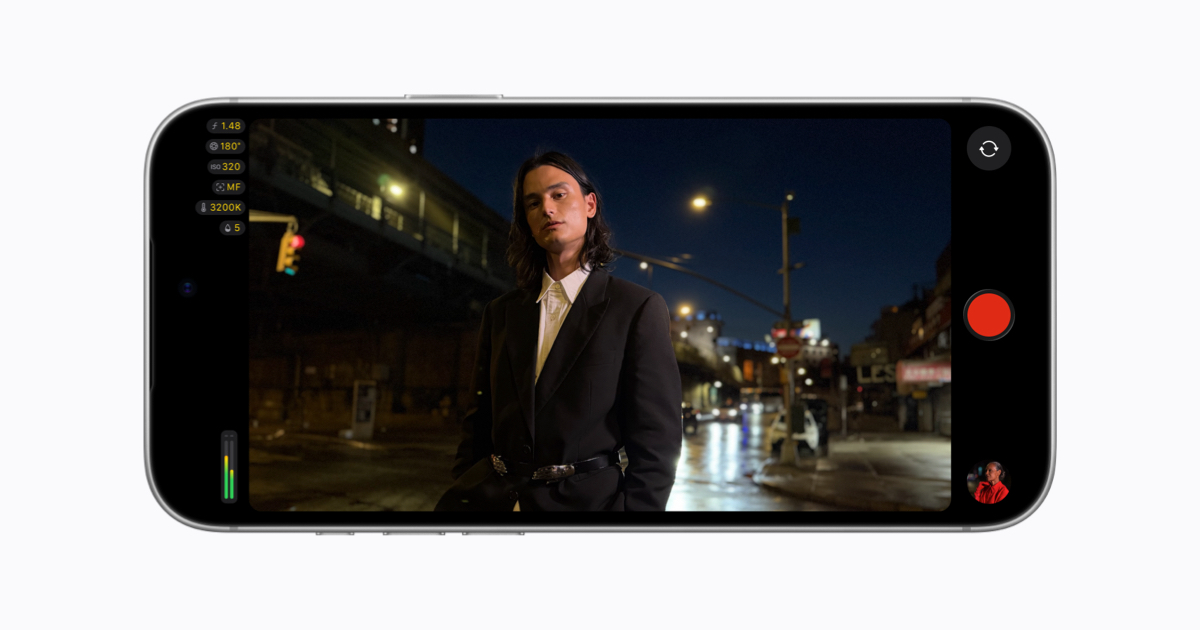
On the video side, Final Cut Pro and Motion on Mac are gaining new ways to apply Cinematic mode effects to video captured natively on iPhone 18 Pro. Apple says editors will be able to adjust focus points and depth of field directly in the Final Cut Pro timeline.
For Mac-centric teams producing gameplay-adjacent video — dev diaries, behind-the-scenes footage, live event clips, creator collabs — this matters because iPhone capture is often the fastest path from “recorded” to “edited.” Better post control over focus and depth effects can reduce the need for reshoots and make small productions look more polished without expanding the kit.
Apple also notes Compressor support: it can convert video with Cinematic mode effects back into the previous Cinematic mode format, and it’s adding new HEVC and MPEG-4 export presets aimed at social sharing. Social presets won’t replace a properly managed delivery pipeline, but they do reduce friction when you just need a clean export for a platform-specific post.
Keynote, Pages, Numbers: templates, collaboration friction reduced, and more functions
Apple Creator Studio subscribers are also getting new professionally designed templates and themes in Keynote, Pages, and Numbers. Keynote adds “intelligent slide generation” that automatically creates images tailored to a presentation. This sits more in the productivity lane than the creative pro lane, but it’s relevant for anyone pitching a game, reporting milestones, or putting together partner updates on a Mac.
Apple is also improving collaboration flow: Keynote, Pages, and Numbers users can request access to shared files (presentations, documents, spreadsheets) more easily. That’s the kind of small platform-level improvement that reduces the time lost to permissions ping-pong when you’re coordinating across a studio, an external PR team, or a contractor network.
On Mac specifically, Pages adds Screen View for reading and focused writing, and Numbers gains new trigonometry, statistics, and logic functions — useful for anyone building lightweight planning models, balancing sheets, or analysis outside of a dedicated analytics stack.
Freeform: Dark Mode boards, folders, and more Apple Intelligence integration
Freeform picks up several updates that should appeal to teams using it like a lightweight whiteboard: boards automatically adapt to Dark Mode, and folders let you organize boards into collections and invite collaborators. Apple also mentions Writing Tools with Apple Intelligence for rewriting, proofreading, and summarizing handwritten notes, plus the ability to automate adding content using Shortcuts and to request access for collaboration on shared files.
Finally, Apple highlights visionOS 27 improvements: Freeform can pull multiple items from a board (including images, videos, sticky notes, shapes, and 3D models) into a user’s space and view 3D models together as a group. For most MacGaming.com readers this will be peripheral, but it’s another sign Apple wants creative planning and review workflows to move fluidly across Mac, iPad, iPhone, and Vision.
Why Mac ecosystem readers should care
The headline here isn’t a new GPU feature or a new game porting push — it’s pipeline polish. Apple’s updates target the creator “surround” that modern game development and game marketing relies on: fast asset production, quick video turnaround, collaborative docs, and lightweight ideation boards. If you’re already all-in on Apple Silicon, these improvements are the kind that make the platform feel more cohesive day-to-day, even when the news isn’t explicitly about games.
For Apple’s full announcement and the original wording of each update, see the Apple Newsroom post: New updates coming to Apple Creator Studio.



Comments
Sign in to join the conversation.
Log in to commentNo comments yet. Be the first to join the conversation.