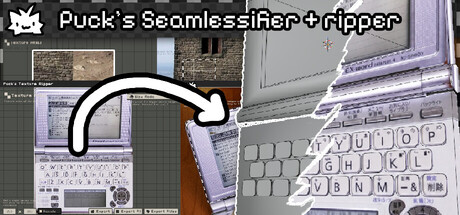

Puck’s Seamlessifier + Ripper isn’t a traditional “game,” but it’s the kind of Mac-friendly utility that quietly becomes essential if you build worlds, not just play in them. Designed for artists and developers who need reliable textures fast, it combines two core jobs into a single workflow: ripping textures from photos (even when they’re shot at an angle) and then seamlessifying them into repeatable tiles you can drop into a game project.
The headline feature is right in the name: you can pull a usable texture out of an image from any perspective using custom polygon selection, then immediately iterate on making that rip tile cleanly. For Mac users on Apple Silicon, it’s a focused, production-minded tool aimed at the exact pain points of texture sourcing: perspective correction, edge seams, lighting mismatch, and getting everything exported in a format engines actually want.
What You Actually Do in Puck’s Seamlessifier + Ripper
The workflow is straightforward and built around fast iteration:
- Select and extract (rip) textures from a source photo using a customizable polygon-based selection. This is especially useful when your “texture” isn’t shot perfectly head-on.
- Preview results in real time, with individual outputs for each ripper, so you can compare and refine without constantly exporting.
- Generate seamless tiles using multiple methods (including Smoothed Collage and Scattered Edges) depending on whether you’re dealing with organic materials, noisy surfaces, or structured patterns.
- Tune the finishing controls like seam blending, detail restoration, contrast enhancement, and lighting correction—tools that matter when your source photo has shadows, uneven exposure, or camera noise.
- Export ripped textures, all textures, or a complete texture atlas as PNG files.
Key Features Mac Creators Will Care About
- Polygon-based ripping with perspective support: Instead of being limited to rectangles, you can define the exact surface you want and correct perspective through custom shapes.
- Real-time texture preview: A big quality-of-life win—especially when you’re testing different seamless modes and seam settings.
- Texture atlas creation: Pack multiple textures together and export as a single atlas for efficient use in engines and pipelines.
- Multiple seamless generation approaches: Different textures fail in different ways; having several methods means you can pick what best preserves the character of the material.
- Pixel-art friendly workflow: The retro-inspired interface and “quick tool” feel make it approachable for pixel artists and small teams who want speed over heavyweight complexity.
Limitations (and When You’ll Notice Them)
This is a practical tool, but texture work always has caveats—and the developer is candid about them:
- Source image quality matters: If your photo has strong directional lighting, heavy compression, or busy elements that shouldn’t repeat, seamless results will vary.
- Complex perspective distortion may need manual adjustment: The polygon approach helps, but extreme angles can take some fiddling.
- High-res textures and strong blur settings can slow processing: Expect longer iteration times when pushing large images.
- Some seamless modes are experimental: Certain texture types may produce inconsistent results depending on pattern regularity.
- Atlas packing is manual: It packs and exports, but it won’t fully auto-optimize placement the way dedicated atlas tools might.
- Professional polish may still require extra tweaking: For shipping-grade assets, you may still want a pass in your image editor of choice.
Who It’s For
- Indie devs and level designers building texture libraries for prototypes and production.
- Pixel artists who want a fast, repeatable way to generate tiles from photo sources while staying in a pixel-art-friendly workflow.
- Environment artists who need to extract and normalize surfaces quickly (wood, stone, asphalt, fabric, plaster, etc.).
- Anyone making 2D/3D games who benefits from a “rip → seamless → atlas → export” loop without juggling multiple apps.
Mac System Requirements
Minimum:
- Requires an Apple processor
- OS: macOS 11
- Processor: Apple M1
- Memory: 8 GB RAM
- Storage: 500 MB available space
Recommended:
- Requires an Apple processor
- OS: macOS 11
- Processor: Apple M1
- Memory: 16 GB RAM
- Storage: 1 GB available space
Bottom Line
Puck’s Seamlessifier + Ripper is a niche tool in the best sense: it’s built to solve a real, common production problem for game art on Mac—turning imperfect, angled, real-world photos into usable, repeatable textures. If your pipeline involves sourcing materials, building tilesets, or rapidly generating texture variations, this is the kind of Apple Silicon-native utility that can save hours across a project.
Bonus tip from the listing: if you like the workflow, you may also want to try it alongside Puck’s Pixelizer.




Comments
Sign in to join the conversation.
Log in to commentNo comments yet. Be the first to join the conversation.