
Overview
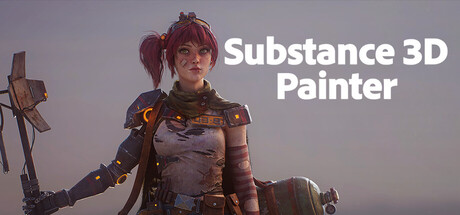
Substance 3D Painter 2026 is Adobe’s flagship texturing application and one of the most important tools in modern asset pipelines. Whether you’re building hero props for an AAA production, shipping an indie title, or creating cinematic-quality materials for animation and VFX, Painter is designed to turn raw 3D models into production-ready assets quickly—without sacrificing realism.
On Mac, the 2026 release continues the shift toward a streamlined, Apple Silicon-first experience. If you’re working in a game art workflow on macOS, Painter is often the final “look-dev” step where your models gain believable surface detail: wear and tear, roughness variation, dirt buildup, edge highlights, decals, and fine micro-scratches.
What makes Painter essential for game artists
At its core, Painter is a PBR (Physically Based Rendering) texturing suite. Instead of painting a single diffuse texture like older workflows, you author multiple maps (such as base color, roughness, metallic, normal, height, emissive, and more) that respond correctly to lighting in real-time engines.
Smart Materials that adapt to your mesh
Painter’s Smart Materials are one of its biggest productivity wins. Rather than manually painting every edge highlight or grime pass, you can apply materials that react to the model’s curvature and ambient occlusion. This means edge wear appears where it should, dirt settles naturally in crevices, and layered materials feel consistent across an asset.
For Mac-based artists, this is a huge time saver when iterating on props, modular environment pieces, weapons, or vehicles—especially when art direction changes late in production.
Particle effects and physics-assisted weathering
Need convincing rain streaks, sandblasting, mud splatter, soot, or dripping grime? Painter includes particle-based tools that can leverage an integrated physics workflow to help create believable wear. Instead of hand-painting every streak, you can generate natural results and then refine them where it matters.
Scales from beginners to advanced UDIM pipelines
Painter is approachable for first-time 3D artists, but it also scales to serious production needs. If you work with multiple texture sets or UDIMs, Painter supports complex assets that span many tiles—useful for characters, high-detail environment pieces, or any model that needs more resolution than a single texture set can provide.
Export anywhere: Unity, Unreal, Godot, and offline renderers
One of Painter’s strengths is how well it fits into mixed toolchains. It’s compatible with major game engines and renderers including Unity, Unreal Engine, Godot, and popular offline options like VRay, Redshift, and RenderMan.
In practical terms, this means Painter can export textures in formats and channel packings that closely match what you previewed in the viewport—reducing the classic “it looked different in-engine” headache. For Mac game developers collaborating across platforms, standardized export presets help keep handoffs predictable.
Community and learning resources
The Substance 3D community is one of the strongest parts of the ecosystem. If you’re learning texturing or troubleshooting a specific workflow (UDIM setup, anchor points, channel packing, export settings for a specific engine), there are active communities on Discord and official forums where experienced artists often share fixes, breakdowns, and best practices.
Steam version vs Adobe subscriptions: what Mac users should know
Substance 3D Painter is available through different licensing routes, and the differences matter:
- Substance 3D Indie subscription: You’ll always have access to the latest version as long as your subscription remains active.
- Standalone perpetual (Steam) version: You get free feature updates until March 2027. After that, you keep the version you bought—similar to purchasing a traditional app/game license on Steam.
- Assets platform + generative AI features: Unmetered access to the Substance 3D Assets platform and generative AI features are available through Adobe and are not included with the Steam version.
Mac performance expectations
Painter is a GPU-forward app: viewport responsiveness and baking performance can depend heavily on your Apple Silicon tier and memory headroom. For hobbyist prop work, the minimum specs can be workable, but professional production (high-resolution texture sets, multiple UDIM tiles, heavy layer stacks, and complex bakes) benefits significantly from the recommended tier.
Mac system requirements
Minimum
Minimum:
- Requires an Apple processor
- OS: macOS 12 Monterey
- Processor: Apple M1
- Memory: 16 GB RAM
- Graphics: Apple M1
- Storage: 10 GB available space
Recommended
Recommended:
- Requires an Apple processor
- OS: macOS 13 Ventura
- Processor: Apple M2 Pro
- Memory: 32 GB RAM
- Graphics: Apple M2 Pro
- Storage: 10 GB available space
Who should get Substance 3D Painter 2026 on Mac?
- Indie devs and solo creators who need fast, high-quality PBR materials without building everything from scratch.
- Professional game artists shipping assets to Unity/Unreal/Godot pipelines and needing reliable export presets.
- Students and hobbyists who want to learn industry-standard texturing workflows that translate directly to studio pipelines.
Bottom line
Substance 3D Painter 2026 remains the benchmark for modern 3D texturing, and its Apple Silicon requirements make it a clear fit for contemporary Mac setups. If you build 3D assets for games, it’s less a “nice-to-have” and more a cornerstone tool—especially when you value rapid iteration, realistic materials, and predictable exports to your engine of choice.



Comments
Sign in to join the conversation.
Log in to commentNo comments yet. Be the first to join the conversation.